

Description
Your readers notice a dead link or a download that won’t start long before you do. LinkSentry gives them a “Report an issue” button that opens a short form. You get an email and a list of all reports in your dashboard.
Shows up where you want it
- Automatically after or before the content of posts, pages or any public post type
- Or as a floating button in the corner of the screen
- Or exactly where you place the block “Report Issue (LinkSentry)” or the shortcode
[linkbrco] - Hide it on single pages with the switch “Hide report button” in the editor sidebar
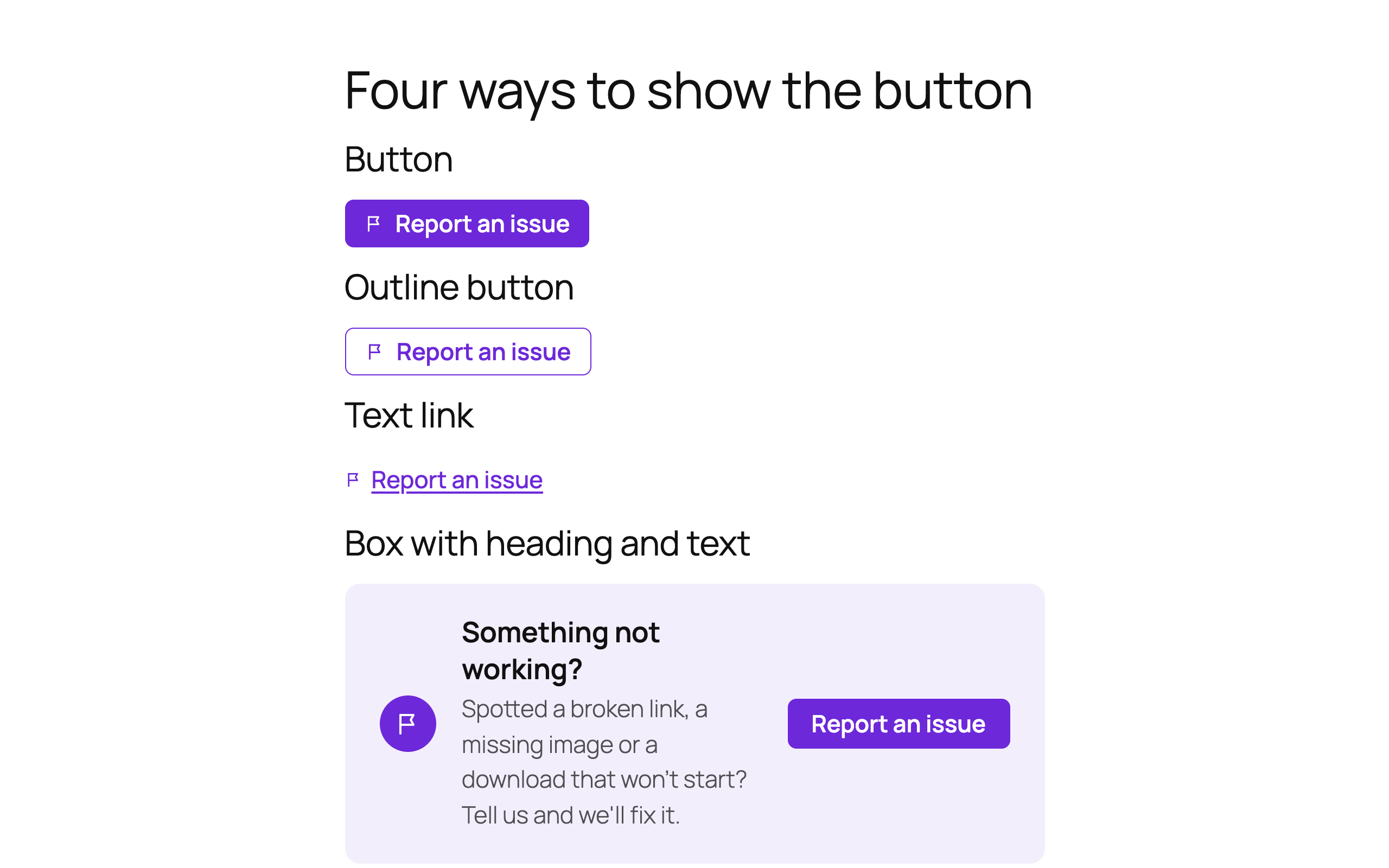
Four looks, one click to change
- Button, outline button, text link or a box with heading and text
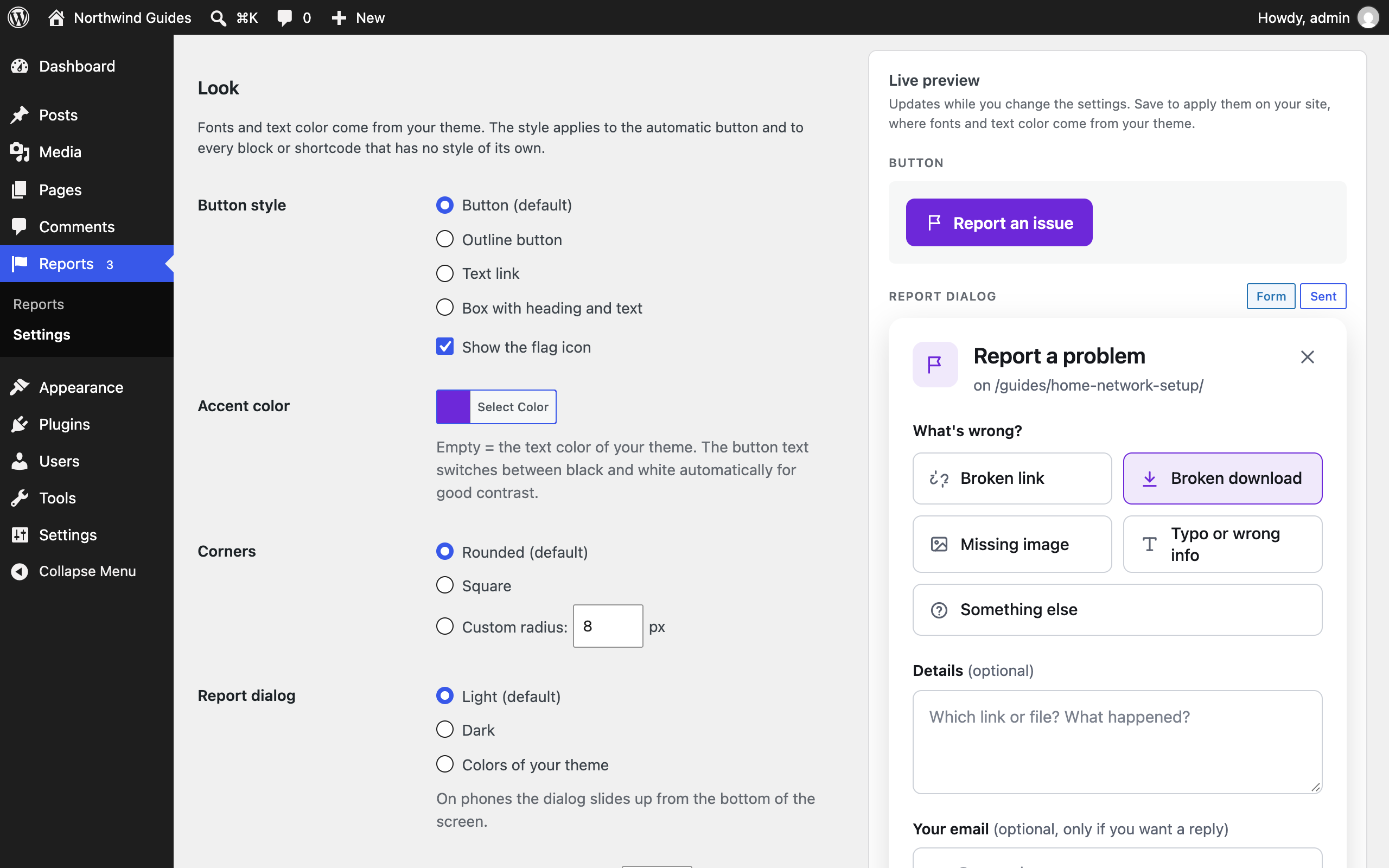
- Accent color, corners and optional font sizes in the settings; fonts and text color come from your theme
- Light, dark or theme-colored report dialog
- Live preview on the settings screen: see every change before you save
- On phones the dialog slides up from the bottom as a sheet with large tap targets
A form readers actually fill in
- Readers pick what is wrong from big tiles: Broken link, Broken download, Missing image, Typo or wrong info, Something else
- Add your own issue types, rename, reorder or switch them off, each with its own icon
- Details and email field: optional, required or hidden
- Optional consent checkbox with a link to your privacy policy
- A clear thank-you message instead of a disappearing notice
Works with page caching, no captcha
- Reports are sent to the WordPress REST API without a page nonce, so the form keeps working on cached pages
- Spam is stopped by a hidden trap field, a minimum fill time, a wait time per visitor and a daily limit per page
- Only reports about pages of your own site are accepted
- Optional captcha: Google reCAPTCHA v2 or hCaptcha, loaded only when a reader opens the dialog
Privacy built in
- IP addresses are never stored in plain text; the anonymized fingerprint is off by default
- Storing browser details can be switched off
- Delete old reports automatically after a number of days
- Connected to the WordPress tools for exporting and erasing personal data
- Suggested text for your privacy policy page
- No tracking and no cookies; the optional captcha is the only external service and is off by default
For the site team
- Every report lists the page, issue type, details and the reader’s email
- Jump straight to the page or its editor from the report
- Email notification to one or more addresses; reply to it to answer the reader
- Red counter of unread reports in the admin menu
Shortcode
[linkbrco] shows the button with the style from the settings. Attributes:
style–button,outline,linkorboxlabel– button texttitleandtext– heading and text of the box style
Example: [linkbrco style="box" title="Something not working?"]
The shortcode [linksentry] and the attributes buttonStyle and infoText of version 1 keep working.
External services
The plugin works without any external service. Only if you choose a captcha under Reports > Settings > Spam protection (off by default), it connects to the service you picked:
Google reCAPTCHA
Used to tell readers and spam bots apart. When a reader opens the report dialog, the reCAPTCHA script is loaded from google.com; Google receives the reader’s IP address, browser data and interaction with the widget. When the report is sent, your server sends the answer token, your secret key and the reader’s IP address to Google to check it.
Terms of Service: https://policies.google.com/terms
Privacy Policy: https://policies.google.com/privacy
hCaptcha
Used to tell readers and spam bots apart. When a reader opens the report dialog, the hCaptcha script is loaded from hcaptcha.com; Intuition Machines, Inc. receives the reader’s IP address, browser data and interaction with the widget. When the report is sent, your server sends the answer token, your site key, your secret key and the reader’s IP address to hCaptcha to check it.
Terms of Service: https://www.hcaptcha.com/terms
Privacy Policy: https://www.hcaptcha.com/privacy
Screenshots


Blocks
This plugin provides 1 block.
- Report Issue (LinkSentry) A Report an issue button that opens a short form for broken links, downloads, images and typos.
Installation
- Install and activate the plugin through the “Plugins” screen.
- Go to Reports > Settings and choose under “Placement” where the button appears, for example after every post.
- Optional: pick a style and accent color. The live preview shows the result right away.
Prefer one spot only? Leave Placement off and insert the block “Report Issue (LinkSentry)” or the shortcode [linkbrco].
FAQ
-
Can guests send reports?
-
Yes, no login is needed.
-
Does it work with caching plugins?
-
Yes. The form does not depend on a security token in the page, so cached pages work.
-
Where do I see the reports?
-
Under “Reports” in the admin menu. A red counter shows reports you have not opened yet. You also get an email for every new report unless you switch that off.
-
How do I stop spam?
-
The built-in protection works without a captcha: a hidden trap field, a minimum fill time, a wait time between reports from the same visitor and a daily limit per page. All limits can be changed under Reports > Settings > Spam protection. If spam still gets through, switch on Google reCAPTCHA or hCaptcha there and enter the keys of the service.
-
Can I translate the texts?
-
All texts are translatable. Texts you leave empty in the settings use the default wording in the language of the page.
-
Does it work with WPML and Polylang?
-
Yes. Your own texts and issue types from Reports > Settings appear in String Translation (WPML) or Strings translations (Polylang) and are shown in the language of the page. The texts of blocks and shortcodes are translated with the page. Reports themselves are not translated; each report keeps the address of the language version it was sent from.
-
My site is behind a proxy or CDN. Is the wait time per visitor still correct?
-
LinkSentry trusts only the connection address, because forwarded headers can be faked. If all visitors share the address of your proxy, return the real visitor address with the filter
linkbrco_client_ip. -
Are reports deleted when I uninstall the plugin?
-
Only if you enabled “Delete all reports when the plugin is deleted” under Reports > Settings. Settings are always removed.
Reviews
There are no reviews for this plugin.
Contributors & Developers
“LinkSentry – Broken Content Reporter” is open source software. The following people have contributed to this plugin.
Contributors
Translate “LinkSentry – Broken Content Reporter” into your language.
Interested in development?
Browse the code, check out the SVN repository, or subscribe to the development log by RSS.
Changelog
2.0.0
- New: Show the button automatically before or after the content, or as a floating button in the corner.
- New: “Hide report button” switch per post in the editor sidebar.
- New: Redesigned report dialog with issue type tiles, a thank-you state and a bottom sheet on phones.
- New: Button styles button, outline, text link and box; accent color, corners and light, dark or theme-colored dialog.
- New: Settings moved to Reports > Settings, with a live preview of every change.
- New: Button and text link take the size of the surrounding text; own font sizes for button, box and dialog are optional.
- New: Dashboard widget with unread reports, the most reported pages and the latest reports.
- New: Own issue types with label, icon, order and on/off switch; new default type “Typo or wrong info”.
- New: Details and email field can be optional, required or hidden; optional consent checkbox.
- New: Several notification recipients; replying to the email answers the reader.
- New: Daily limit per page and minimum fill time against spam.
- New: Optional captcha with Google reCAPTCHA v2 or hCaptcha (off by default, loaded only when the dialog opens).
- New: Privacy tools: export and erase reports by email, suggested privacy policy text, automatic deletion after a number of days, choice of stored data.
- New: Link from the report to the editor of the reported page.
- New: WPML and Polylang: own texts and issue types can be translated per language (wpml-config.xml); reports are excluded from translation.
- Fixed: Reports failed with “Invalid security token” on cached pages. Reports are now sent through the REST API without a page nonce.
- Fixed: A wait time of 0 seconds blocked every visitor after one report.
- Fixed: The wait time could be bypassed with faked proxy headers.
- Fixed: An empty button text in the settings showed a button without label.
- Improved: No jQuery and no Dashicons on the frontend; the dialog uses the native dialog element.
- Improved: The notification email names the issue type in plain words and no longer sets its own sender address.
1.0.1
- Fixed: Fatal error when using the
[linksentry]/[linkbrco]shortcode without attributes (strict typing). - Fixed: Wrong page URL on sub-directory installs (duplicated sub-path).
- Fixed: Duplicate HTML element IDs when multiple report boxes appear on one page (accessibility/validity).
- Fixed: Block alignment selected in the editor is now applied on the front end.
- Fixed: Block editor script now declares its dependencies for reliable loading.
- Fixed: “Issue Type” admin column is now actually sortable.
- Fixed: Notification emails no longer HTML-escape plain-text content.
- Improved: Lighter unread-count query for the menu badge (runs once per request).
- Removed: Debug logging and brittle third-party mail-plugin detection.
- Fixed: Block now uses block API version 3 for WordPress 7.0+ iframe editor compatibility.
- Fixed: Dashicons stylesheet is now loaded on the front end so button/modal icons render for logged-out visitors.
- Fixed: Unread-count menu badge now uses the native WordPress red bubble and shows correctly on every admin page (previously unstyled outside the Reports screen).
- Fixed: Notification email setting: an invalid stored address no longer silently disables notifications; it now falls back to the admin email, the field can be left empty as documented, and invalid input shows a settings error.
- Compatibility: Tested up to WordPress 7.0.
1.0.0
- Initial release
- Custom post type for reports
- Shortcode and Gutenberg block
- AJAX submission with security features
- Email notifications
- Admin settings page
- Full internationalization support
- Multiple button styles (button, text-link, large-box) for block and shortcode
- Report content visible in editor with full message display
- Report details meta box showing all report information
- Menu badge showing count of unread reports
- Automatic email notifications to admin on new reports
- Delete all reports functionality in settings
- Option to delete reports on plugin uninstall
- Reports marked as read when viewed
- Removed “Add New Report” capability from backend
- Improved email notification formatting with report links