

Description
Bulkzy for WooCommerce is the all-in-one B2B wholesale and bulk sales toolkit designed to skyrocket your store’s average order value (AOV). Turn your standard WooCommerce store into a high-converting wholesale portal with automated volume discounts, role-based tiered pricing, Minimum Order Quantity (MOQ) controls, and instant bulk order matrix tables.
Whether you run a B2B wholesale store, commercial supply business, distribution network, or retail shop offering volume breaks (“Buy More, Save More”), Bulkzy provides seamless tools with zero bloat and full High-Performance Order Storage (HPOS) compatibility.
This plugin requires WooCommerce and is independently developed to support WooCommerce store owners.
🌟 Key Features at a Glance
- Role-Based Wholesale Pricing: Deliver tailored pricing tiers for regular retail customers and verified wholesale accounts (
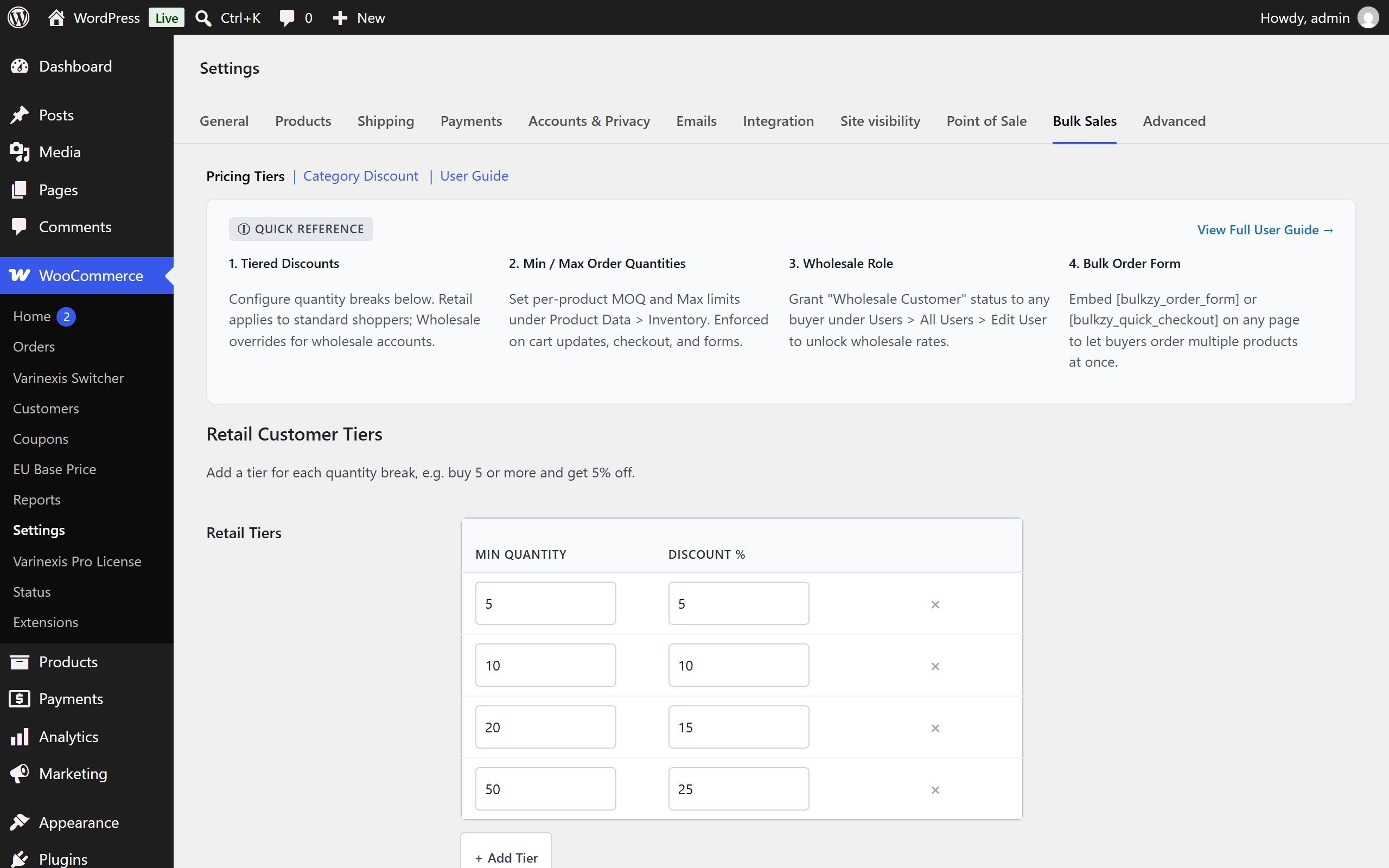
Wholesale Customer). - Dynamic Tiered Pricing & Quantity Breaks: Set unlimited quantity-based discount tiers (e.g., Buy 5+ get 5% off, Buy 10+ get 10% off, Buy 25+ get 20% off).
- Interactive Tier Builder UI: Configure and manage quantity breaks effortlessly with live in-dashboard rule previews.
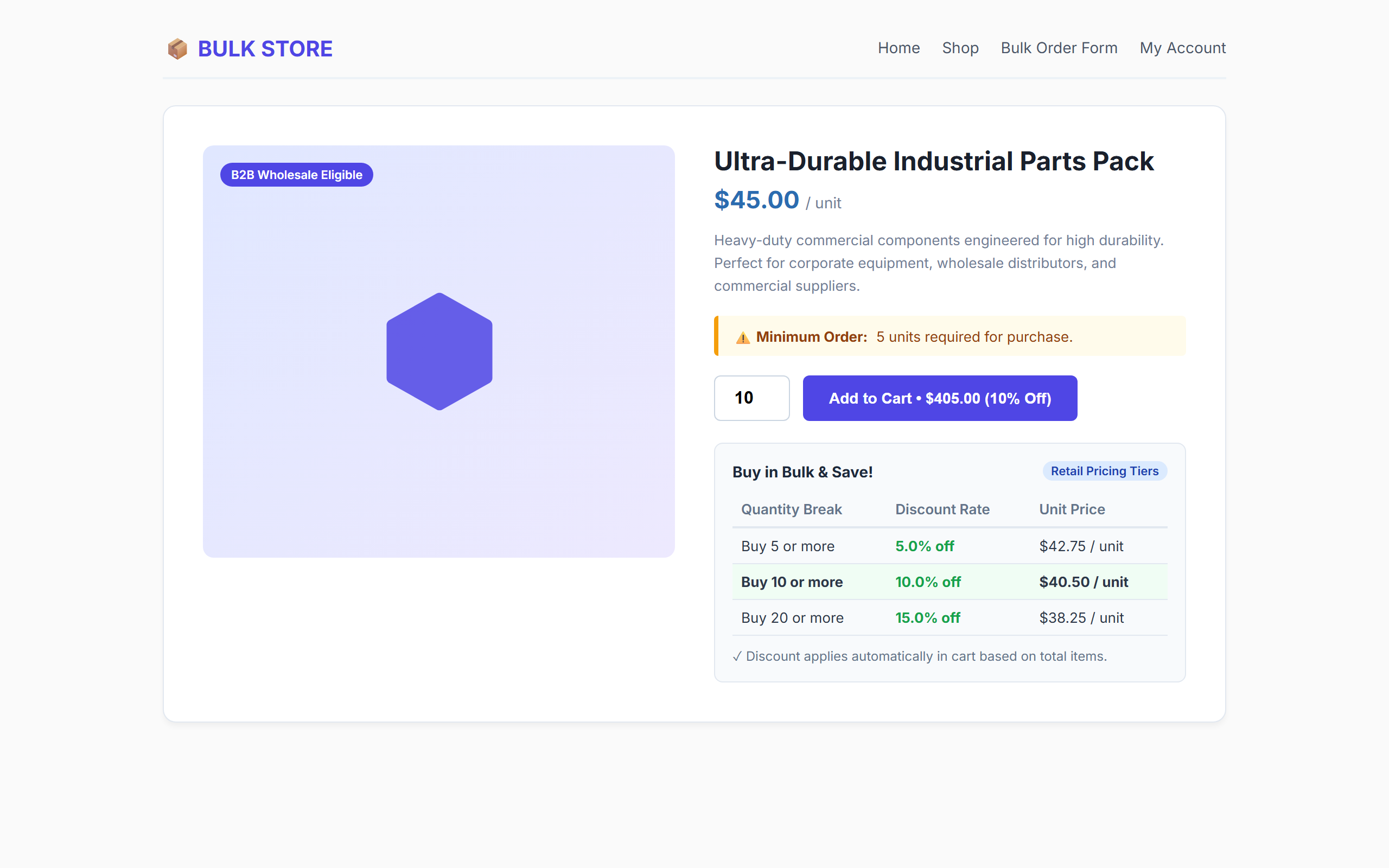
- Minimum Order Quantity (MOQ): Enforce minimum unit purchase requirements globally per product on single product pages, cart updates, and checkout.
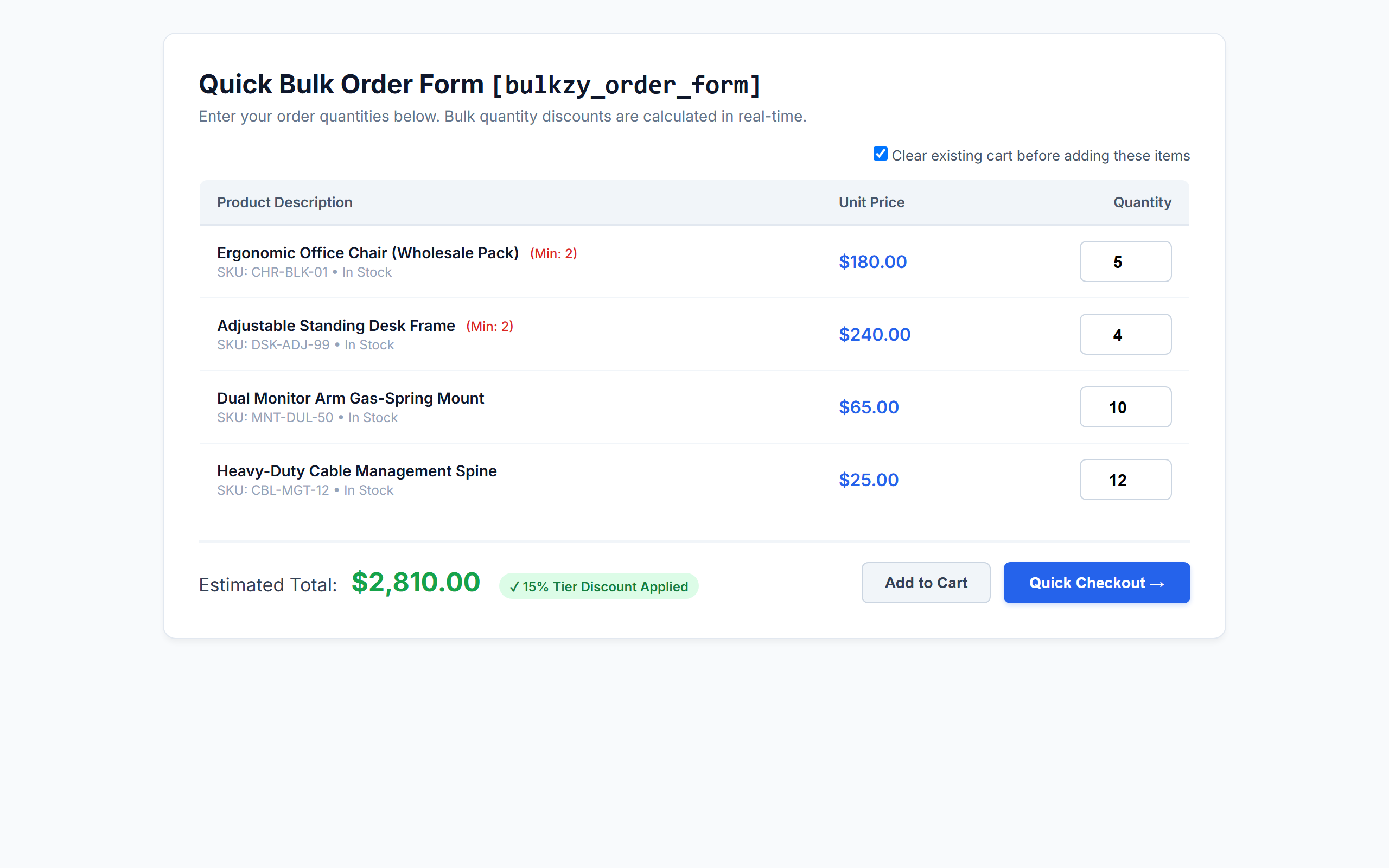
- AJAX Bulk Order Form Shortcode (
[bulkzy_order_form]): Provide high-volume buyers with a fast, one-page ordering table featuring live dynamic total calculations. - Quick Checkout Landing Page (
[bulkzy_quick_checkout]): Allow wholesale buyers to fill quantities and skip directly to checkout with cart reset capability. - Visual On-Page Bulk Pricing Tables: Automatically showcase available quantity discounts right below the “Add to Cart” button on single product pages.
- Category-Specific Bulk Discounts: Apply volume discounts exclusively to products within designated categories.
- WooCommerce HPOS Compatible: 100% compatible with High-Performance Order Storage (Custom Order Tables) and legacy post storage.
- Blazing Fast & Lightweight: Zero external bloat, vanilla frontend scripts, and clean standard WooCommerce cart fee engine.
💼 Perfect for B2B & Wholesale Niches
- Manufacturers & Wholesalers: Supply commercial buyers with wholesale price tiers and enforced batch minimums (MOQ).
- Corporate & Office Supplies: Enable businesses to order bulk office furniture, stationary, and tech gear in seconds.
- Apparel, Merch & Print-on-Demand: Reward volume orders with automated quantity discount tables.
- Food, Beverage & Grocery Distributors: Sell bulk cases and pallets using category-specific thresholds.
- Retail Stores with Volume Discounts: Increase cart sizes by showing retail shoppers clear incentive tables to buy more units.
⚡ Shortcodes & How to Use Them
Bulkzy includes two shortcodes designed for wholesale ordering pages:
[bulkzy_order_form]– Displays a bulk ordering grid with live total calculation and standard Add to Cart actions.[bulkzy_quick_checkout]– Renders a wholesale bulk matrix with a direct “Quick Checkout” button and optional one-click cart clearing.
Shortcode Attributes:
* limit (optional) – Number of simple products to display (default: 50). Example: [bulkzy_order_form limit="20"]
* category (optional) – Comma-separated category slugs to filter products. Example: [bulkzy_order_form category="hardware,office-supplies"]
* orderby (optional) – Order products by title, date, price, or popularity (default: title).
* order (optional) – Sort direction, ASC or DESC (default: ASC).
🔒 100% Secure, Native & Developer Friendly
- Clean standard WooCommerce cart calculation hook (
woocommerce_cart_calculate_fees). - Safe uninstallation routine with multisite network support.
- Strict nonce verification and capability validation (
promote_users,manage_woocommerce). - Fully translatable with included POT file (
languages/bulkzy-for-woocommerce.pot).
Screenshots
Installation
- Upload the
bulkzy-for-woocommercefolder to your/wp-content/plugins/directory, or install the ZIP file via Plugins > Add New > Upload Plugin. - Activate the plugin through the Plugins screen in WordPress.
- Ensure WooCommerce is active.
- Navigate to WooCommerce > Settings > Bulk Sales to set up your retail and wholesale tiered discounts.
- (Optional) Edit any product under Product Data > Inventory to define a Minimum Order Quantity (MOQ).
- (Optional) Create a new page and add
[bulkzy_order_form]or[bulkzy_quick_checkout]to launch your bulk ordering page.
FAQ
-
Does Bulkzy require WooCommerce to work?
-
Yes. Bulkzy for WooCommerce requires WooCommerce 5.4 or newer. If WooCommerce is deactivated, Bulkzy will automatically display an admin notice and safely pause execution.
-
Do I need to create a “Wholesale Customer” role manually?
-
No! Bulkzy automatically registers the “Wholesale Customer (Bulkzy)” role (
bulkzy_wholesale_customer) when the plugin is activated. To grant wholesale pricing to any customer, simply edit their profile in Users > All Users and check the “Wholesale Status” box. -
How does role-based wholesale pricing work?
-
Bulkzy maintains separate tier matrices for retail shoppers and verified wholesale accounts. When a customer with wholesale status logs in, Bulkzy automatically applies your Wholesale Tiers to their cart instead of standard retail tiers.
-
How do Minimum (MOQ) and Maximum Order Quantities work?
-
You can define both a Minimum Order Quantity (MOQ) and a Maximum Order Quantity for any product under Product Data > Inventory. Limits are automatically enforced on the single product quantity stepper, when adding items to the cart, during cart quantity updates, on checkout, and in bulk order form matrices.
-
Can I apply bulk discounts only to specific product categories?
-
Yes! In WooCommerce > Settings > Bulk Sales > Category Discount, check “Enable Category Discount”, select your target category, set the minimum required category quantity, and define the discount percentage.
-
Are tiered discounts compatible with WooCommerce coupons?
-
Yes. Bulkzy applies discounts as negative cart fees using native WooCommerce fee APIs, ensuring full compatibility with shipping rates, taxes, and standard promotional coupons.
-
Is this plugin compatible with WooCommerce HPOS (High-Performance Order Storage)?
-
Yes, Bulkzy is fully declared and tested compatible with WooCommerce HPOS (Custom Order Tables).
-
What happens if I uninstall the plugin?
-
Bulkzy includes a clean
uninstall.phproutine. If uninstalled via the WordPress dashboard, all plugin settings, post metadata (_bulkzy_moq,_bulkzy_max_qty), and the wholesale role are safely cleaned up across single sites and multisite networks.
Reviews
There are no reviews for this plugin.
Contributors & Developers
“Bulkzy for WooCommerce – Wholesale Pricing, B2B Tiered Discounts, MOQ & Bulk Order Forms” is open source software. The following people have contributed to this plugin.
Contributors
Interested in development?
Browse the code, check out the SVN repository, or subscribe to the development log by RSS.
Changelog
1.0.0
- Initial release of Bulkzy for WooCommerce.
- Role-based tiered pricing engine (Wholesale vs. Retail).
- Interactive tier builder settings interface with live previews.
- Minimum Order Quantity (MOQ) configuration and validation.
- Category-specific bulk volume discounts.
- Visual pricing table on single product pages.
[bulkzy_order_form]and[bulkzy_quick_checkout]AJAX bulk matrix shortcodes.- Full WooCommerce HPOS (High-Performance Order Storage) compatibility.